
CSRSS Basics
0. Preface
This is an incomplete introduction to CSRSS. Since I was analyzing CSRSS-related vulnerabilities recently, I organized some related knowledge. Therefore, you cannot fully understand CSRSS solely through this article. However, if this article can answer some of your questions while learning about CSRSS, then its purpose has been achieved.
1. Historical Background
1.1 Concept of Microkernel
A microkernel refers to the core part of a modern, modular operating system. A microkernel operating system follows two main principles:
- Modularity, encapsulation, and data hiding. That is, only one part of the operating system has system-wide responsibility for a specific function, and other parts of the OS (including applications) can only use this function through defined interfaces.
- Most functions of the operating system execute in user/application mode, with only the microkernel itself and a small portion of hardware-related code executing in kernel mode.
An operating system that adheres to both principles is called a pure microkernel system. An operating system that only follows the first principle but not the second is called a modified microkernel or monolithic kernel (macrokernel) operating system. Commercial operating systems are generally not designed based on pure microkernels because such architectures incur too much computational overhead.
Windows NT is a modified microkernel system, exhibiting excellent modularity and encapsulation. On the other hand, since its initial release, Windows NT has implemented high-performance operating system subsystems in kernel mode. These subsystems can interact with hardware and each other in kernel mode without affecting processor mode and process/thread transition performance. Implemented as kernel-mode subsystems are the memory manager, integrated cache manager, file system, object/security manager, network protocols, network servers, and all thread/process management.
However, prior to Windows NT 4.0, one area remained in pure microkernel mode: the window manager and graphics subsystem, which are used to implement the GUI portion of the Win32 API. In Windows NT 3.51 and earlier, the window manager and GDI were implemented as a separate user-mode process called the Client-Server Subsystem (csrss.exe).
1.2 Win32 Subsystem
During the initial design phase of Windows NT, Win32 was designed to be equivalent to OS/2, POSIX, and other planned operating system environments. Each of these subsystems ran as an independent environment. However, this design would lead to significant duplication of system functionality, affecting system size and performance. To avoid duplication and respond to market trends, in the finalized release of Windows NT 3.1, the Win32 subsystem became a special privileged “program” on which all other subsystems and the entire operating system depended.
Prior to Windows NT 4.0, the Win32 subsystem contained 5 modules residing in different DLL files:
- Window Manager: Handles input and screen I/O;
- Graphics Device Interface (GDI): Drawing library for graphics output devices;
- Graphics Device Driver (GDD): Hardware-dependent graphics driver;
- Console: Provides text window support;
- Operating System Functions: Supports all components in the subsystem.
Placing graphics functionality in a separate Win32 server process incurred significant memory overhead and a large number of thread/process context switches, heavily impacting system performance. Since Windows NT is a window-based operating system with a high volume of graphics and window operations, starting from Windows NT 4.0, the design team moved these commonly used functions from user mode to kernel mode.
In the modified system, the Window Manager, GDI, and GDD functions were moved into kernel mode (i.e., win32k.sys), while console, GUI shutdown, and hard error handling functions remained in the user-mode csrss.exe.
In other words, in the operating systems we use today, csrss.exe + win32k.sys together constitute the Win32 operating system environment. Since most people (including myself) have never interacted with other operating system environments like OS/2 or POSIX, it is initially difficult to understand the functional positioning of csrss.exe.
2. Communication
When a Windows process or thread starts, and during any Windows subsystem operations, ALPC is used to communicate with the subsystem process CSRSS. All subsystem communications with the Session Manager (SMSS) also take place via ALPC.
ALPC, which stands for Advanced (or Asynchronous) Local Procedure Call, is a high-speed, scalable, and secure message-passing mechanism used to transfer messages of arbitrary size. It is generally used between a server process and multiple client processes of that server. ALPC connections can be established between multiple user-mode processes, between a kernel-mode component and multiple user-mode processes, or between two kernel-mode components. ALPC uses an executive object called a port object to maintain the state required for communication. This object can represent various ALPC ports:
- Server connection port: A named port that acts as the server’s connection request point, through which clients can connect to the server;
- Server communication port: An unnamed port used by the server to communicate with one of its clients; the server provides one such port for each active client;
- Client communication port: An unnamed port used by a client to communicate with its server;
- Unconnected communication port: An unnamed port used by a client to communicate with itself locally. This model was deprecated during the transition from LPC to ALPC, but is still simulated for Legacy LPC due to compatibility reasons.
ALPC follows a connection and communication model similar to BSD socket programming. The server first creates a server connection port (NtAlpcCreatePort), and the client can connect to this port (NtAlpcConnectPort). If the server is in listening mode (NtAlpcSendWaitReceivePort), it will receive a connection request message and can choose to accept the request (NtAlpcAcceptConnectPort). At this point, the client and server communication ports are established, and each corresponding endpoint process receives a handle to its communication port. Messages are then passed through these handles (NtAlpcSendWaitReceivePort). In the simplest scenario, a single server calls NtAlpcSendWaitReceivePort in a loop to accept connection requests or process/reply to messages. The server distinguishes messages using the PORT_HEADER structure, which resides at the outermost layer of every message and contains the message type.
Once a connection is established, a connection information structure (blob) is used to store the associations between all the different ports.
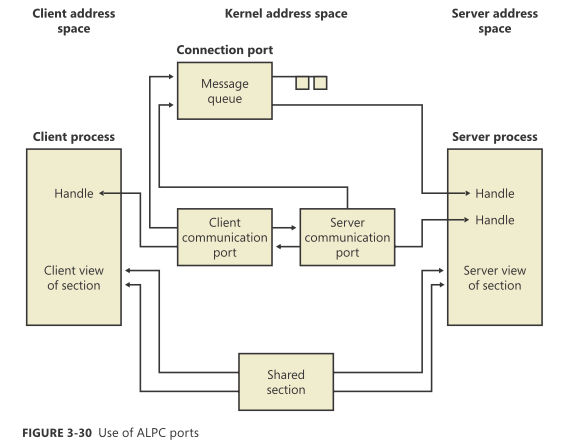
In the description above, the client and server can only send requests and wait for responses by alternately calling NtAlpcSendWaitReceivePort in a blocking loop. However, ALPC also supports asynchronous messaging, allowing both communicating parties to avoid blocking and instead perform other tasks, checking for messages later. ALPC supports the following message exchange mechanisms:
- Standard double-buffering mechanism. The kernel retains a copy of the message by copying it from the source process, then transitions to the target process and copies the data from the kernel buffer. For compatibility reasons, if Legacy LPC is used, this method can send messages of at most 256 bytes, whereas ALPC can allocate extended buffers for messages up to 64 KB;
- Storing messages in an ALPC section object, where the client and server process the messages by mapping views;
In asynchronous message mode, messages can be canceled—for example, if a request takes too long or if the user indicates they want to cancel the previous operation. The NtAlpcCancelMessage system call can be used in ALPC to cancel messages.
An ALPC message can reside in one of the following five queues implemented by the ALPC port object:
- Main queue: The message has been sent, and the target is processing it;
- Pending queue: The message has been sent, the sender is waiting for a response, but the response has not yet been sent;
- Large message queue: The message has been sent, but the sender’s buffer is too small to accommodate it; the sender then has the opportunity to allocate a larger buffer and request the message again;
- Canceled queue: The message was sent to the port but has been canceled;
- Direct queue: Messages sent with an attached direct event.
3. Specific Functions
By checking the module names loaded by csrss.exe in Process Hacker, we can find that the DLL files related to CSRSS functions include: basesrv.dll (Windows NT BASE API Server DLL), winsrv.dll (Multi-User Windows Server DLL), csrsrv.dll (Client Server Runtime Process), sxssrv.dll (Windows SxS Server DLL), and sxs.dll. The table below summarizes the ServerApiDispatchTable and exported functions contained in these files:
| basesrv.dll | winsrv.dll | csrsrv.dll | sxssrv.dll | sxs.dll |
----------------------------------------------------------------------------------------------------------------------------------
| BaseSrvCreateProcess | | | | |
| BaseSrvDeadEntry | | | | |
| BaseSrvCheckVDM | | | | |
| BaseSrvUpdateVDMEntry | | | | |
| BaseSrvGetNextVDMCommand | | | | |
| BaseSrvExitVDM | | | | |
| BaseSrvIsFirstVDM | | | | |
| BaseSrvGetVDMExitCode | | | | |
| BaseSrvSetReenterCount | | | | |
| BaseSrvSetProcessShutdownParam | | | | |
| BaseSrvGetProcessShutdownParam | | | | |
| BaseSrvSetVDMCurDirs | | | | |
Dispatch Table| BaseSrvGetVDMCurDirs | SrvEndTask | CsrSrvClientConnect | | |
| BaseSrvBatNotification | | | | |
| BaseSrvRegisterWowExec | | | | |
| BaseSrvSoundSentryNotification | | | | |
| BaseSrvRefreshIniFileMapping | | | | |
| BaseSrvDefineDosDevice | | | | |
| BaseSrvSetTermsrvAppInstallMode| | | | |
| BaseSrvSetTermsrvClientTimeZone| | | | |
| BaseSrvCreateActivationContext | | | | |
| BaseSrvRegisterThread | | | | |
| BaseSrvDeferredCreateProcess | | | | |
| BaseSrvNlsGetUserInfo | | | | |
| BaseSrvNlsUpdateCacheCount | | | | |
| BaseSrvCreateProcess2 | | | | |
| BaseSrvCreateActivationContext2| | | | |
----------------------------------------------------------------------------------------------------------------------------------
| | | CsrAddStaticServerThread | | |
| | | CsrCallServerFromServer | | |
| | | CsrConnectToUser | | |
| | | CsrCreateProcess | | |
| | | CsrCreateRemoteThread | | |
| | | CsrCreateThread | | |
| | | CsrDeferredCreateProcess | | |
| | | CsrDereferenceProcess | | |
| | | CsrDereferenceThread | | |
| | | CsrDestroyProcess | | |
| | | CsrDestroyThread | | |
| | | CsrExecServerThread | | |
| BaseGetProcessCrtlRoutine | | CsrGetProcessLuid | | |
| BaseSetProcessCreateNotify | SrvEndTask | CsrImpersonateClient | | |
| BaseSrvNlsLogon | UserCreateCallbackThread | CsrIsClientSandboxed | | |
Export Func | BaseSrvNlsUpdateRegistryCache | UserHardError | CsrLockProcessByClientId | | |
| BaseSrvRegisterSxS | UserServerDllInitialization| CsrLockThreadByClientId | | |
| ServerDllInitialization | | CsrLockedReferenceProcess | | |
| | | CsrQueryApiPort | | |
| | | CsrReferenceThread | | |
| | | CsrRegisterClientThreadSetup| | |
| | | CsrReplyToMessage | | |
| | | CsrRevertToSelf | | |
| | | CsrServerInitialization | | |
| | | CsrSetBackgroundPriority | | |
| | | CsrSetForegroundPriority | | |
| | | CsrShutdownProcesses | | |
| | | CsrUnhandledExceptionFilter | | |
| | | CsrUnlockProcess | | |
| | | CsrUnlockThread | | |
| | | CsrValidateMessageBuffer | | |
| | | CsrValidateMessageString | | |
----------------------------------------------------------------------------------------------------------------------------------
In Windows Vista and later systems, multiple csrss.exe processes can exist. One csrss.exe process is created by the Session Manager (smss.exe) during system startup to handle requests from session-0 modules and exists throughout the system lifecycle; if this process crashes, the entire system crashes. The remaining csrss.exe processes are created by smss.exe when a user logs on. They are responsible for handling requests from applications under that user session and exist only during the user’s login session; a crash of these processes will not cause the system to crash. All csrss.exe processes run with the highest user privileges: NT AUTHORITY\SYSTEM.
1: kd> dt csrss!_csr_process
   +0x000 ClientId         : _CLIENT_ID
   +0x010 ListLink         : _LIST_ENTRY
   +0x020 ThreadList       : _LIST_ENTRY
   +0x030 NtSession        : Ptr64 _CSR_NT_SESSION
   +0x038 ClientPort       : Ptr64 Void
   +0x040 ClientViewBase   : Ptr64 Char
   +0x048 ClientViewBounds : Ptr64 Char
   +0x050 ProcessHandle    : Ptr64 Void
   +0x058 SequenceNumber   : Uint4B
   +0x05c Flags            : Uint4B
   +0x060 DebugFlags       : Uint4B
   +0x064 ReferenceCount   : Int4B
   +0x068 ProcessGroupId   : Uint4B
   +0x06c ProcessGroupSequence : Uint4B
   +0x070 LastMessageSequence : Uint4B
   +0x074 NumOutstandingMessages : Uint4B
   +0x078 ShutdownLevel    : Uint4B
   +0x07c ShutdownFlags    : Uint4B
   +0x080 Luid             : _LUID
   +0x088 ServerDllPerProcessData : [1] Ptr64 Void
4. Side-by-side
The sxssrv.dll and sxs.dll mentioned above are related to the Windows Side-by-side (SxS) feature. Let’s study SxS here.
4.1 Basic Concepts
Normally, when not using the SxS feature, an application searches for the DLL files it needs to load in the following order:
- The directory from which the application loaded.
- The native Windows system directory (
C:\Windows\System32). - The 16-bit Windows system directory (
C:\Windows\System). - The Windows directory (
C:\Windows). - The current directory at the time the application loaded.
- The directories specified in the
%PATH%environment variable.
This loading method can easily introduce security risks. Windows provides various defense mechanisms against this, which will not be enumerated here.
Considering more complex scenarios, features in a DLL file may be modified for security, performance, or other reasons, leading to DLL version updates. However, programs developed by developers may have strict requirements and can only use functionality provided by a specific version of a DLL. In such cases, the application needs a way to specify which version of the DLL to use, and Windows needs a mechanism to provide that specific version of the DLL to the program. To address this, the concept of a side-by-side assembly was introduced.
According to MSDN, an assembly is the primary unit for naming, binding, versioning, deploying, or configuring blocks of programming code. Applications with common functionality may run shared blocks of programming code, which are called modules or code assemblies. Code assemblies can be placed in DLL files or COM assemblies. The infrastructure used for secure assembly sharing is called side-by-side assembly sharing. A typical side-by-side assembly consists of a single DLL file along with a single manifest. The manifest contains metadata describing the side-by-side assembly and its dependencies.
The explanation above can be quite abstract when first encountered. During my learning process, I simply thought of an assembly as another name for a DLL file—both are a collection of code related to some general functionality.
SxS assemblies can be either private or shared. Shared Windows assemblies are stored under the C:\Windows\WinSxS directory. If an application wants to use the SxS feature, it must provide a manifest file containing DLL version information. When loading a DLL, the system will search the WinSxS directory first based on the contents of the manifest.
4.2 Manifest
An assembly manifest is essentially an XML file.
4.3 Activation Context
Manifests are stored in the resource section of a binary. When the system loads the manifest content, it packages these dependency details into a search structure called an activation context.
The system creates default system-level and process-level activation contexts during boot and process startup. In addition, each thread has an associated activation context stack, where the activation context structure at the top of the stack is the currently active one. Each thread’s activation context stack can be explicitly managed via the ActivateActCtx and DeactivateActCtx functions, or implicitly managed by the system at certain points, such as when the entry point (DLL main routine) of a binary containing dependency information is called.
When resolving DLL file paths, the system first checks the activation context at the top of the current thread’s activation context stack. If it is not found, it checks the process and system activation contexts in sequence.
5. Startup Flow
Startup parameters:
%SystemRoot%\system32\csrss.exe ObjectDirectory=\Windows SharedSection=1024,20480,768 Windows=On SubSystemType=Windows ServerDll=basesrv,1 ServerDll=winsrv:UserServerDllInitialization,3 ServerDll=sxssrv,4 ProfileControl=Off MaxRequestThreads=16
Viewing csrss.exe in IDA, it calls the CsrServerInitialization function in csrsrv.dll, which then calls CsrParseServerCommandLine. Inside, it searches for !_stricmp(name, "ServerDLL"). We can see that when the parameter is ServerDLL=, the function splits the parameter value based on colons and commas, and then calls result = CsrLoadServerDll(value_idx, func_name, num); to load the corresponding DLL file:
...
      else if ( !_stricmp(name, "ServerDLL") )
      {
        cur_char_1 = *value_idx;
        func_name = 0i64;
        idx_1 = value_idx;
        v8 = 0xC000000D;
        if ( !*value_idx )
          return v8;
        while ( 1 )
        {
          if ( cur_char_1 == ':' )
          {
            cur_char_1 = ':';
            if ( !func_name )
            {
              *idx_1++ = 0;
              func_name = idx_1;
              cur_char_1 = *idx_1;
            }
          }
          ++idx_1;
          if ( cur_char_1 == ',' )
            break;
          cur_char_1 = *idx_1;
          if ( !*idx_1 )
            return v8;
        }
        v8 = RtlCharToInteger(idx_1, 0xAu, &num);
        if ( v8 < 0 )
          return v8;
        *(idx_1 - 1) = 0;
        result = CsrLoadServerDll(value_idx, func_name, num);
        v8 = result;
        if ( result < 0 )
          return result;
      }
      ...
CsrLoadServerDll constructs a new structure, tentatively named ServerDllStruct here, and calls the func_name function in the corresponding DLL file with this structure as a parameter. If func_name is not specified, it calls ServerDllInitialization instead:
v7 = dll_name_2.MaximumLength + 0x78;
heap = RtlAllocateHeap(CsrHeap, CsrBaseTag + 0x40000, v7);
server_dll_struct = heap;
Parameters[0] = heap;
if ( heap )
{
  memset_0(heap, 0, v7);
  server_dll_struct->pCsrSrvSharedSectionHeap = CsrSrvSharedSectionHeap;
  server_dll_struct->NameLength = dll_name_2.Length;
  server_dll_struct->NameMaximumLength = dll_name_2.MaximumLength;
  server_dll_struct->pName = &server_dll_struct[1];
  if ( dll_name_2.Length )
    strncpy_s(&server_dll_struct[1], server_dll_struct->NameMaximumLength, dll_name_2.Buffer, dll_name_2.Length);
  server_dll_struct->value = num;
  server_dll_struct->pAddress = dll_addr;
  if ( dll_addr )
  {
    if ( func_name )
      func_name_1 = func_name;
    else
      func_name_1 = "ServerDllInitialization";
    RtlInitString(&func_name_2, func_name_1);
    status_1 = LdrGetProcedureAddress(dll_addr, &func_name_2, 0, &func_addr);
    if ( status_1 < 0 )
    {
      v15 = dll_addr;
      if ( !dll_addr )
        goto LABEL_35;
      goto LABEL_34;
    }
    v12 = (func_addr)(server_dll_struct);
  }
  else
  {
    func_addr = CsrServerDllInitialization;
    v12 = (CsrServerDllInitialization)(server_dll_struct);
  }
  status_1 = v12;
  if ( v12 >= 0 )
  {
    LODWORD(CsrTotalPerProcessDataLength) = ((server_dll_struct->num3 + 7) & 0xFFFFFFF8)
                                          + CsrTotalPerProcessDataLength;
    v13 = server_dll_struct->value;
    CsrLoadedServerDll[v13] = server_dll_struct;
    v14 = server_dll_struct->pCsrSrvSharedSectionHeap;
    if ( v14 != CsrSrvSharedSectionHeap )
      *(v13 * 8 + CsrSrvSharedStaticServerData) = v14;
    return status_1;
  }
  ...
}
Based on the code above, the fields in the ServerDLL values of csrss.exe’s startup parameters have the following meaning:
ServerDll=[DLL Filename]:[Function Name],[Corresponding ServerDllStruct Index]
References
- Analysis and Exploitation of Windows-based CSRSS Process Vulnerabilities (基于Windows的CSRSS进程漏洞分析与利用)
- Analysis of the CSRSS Process (csrss进程剖析)
- Windows CSRSS write up: the basics (part 1/1)
- Windows CSRSS Write Up: Inter-process Communication (part 1/3)
- Windows CSRSS Write Up: Inter-process Communication (part 2/3)
- MS Windows NT Kernel-mode User and GDI White Paper