
[CVE-2023-21752] Windows Backup Service Local Privilege Escalation Vulnerability Analysis
0. Preface
CVE-2023-21752 is the first Microsoft vulnerability of 2023 to have a public exploit. Initially, I thought it would be straightforward to analyze given the availability of exploit code. However, it ended up taking a significant amount of time. The primary challenges lay in two areas: locating the vulnerability and analyzing the exploit code. Therefore, this article dedicates substantial coverage to these two parts. Feedback and corrections are welcome.
1. Vulnerability Overview
According to Microsoft’s official advisory, this is an elevation of privilege vulnerability in the Windows Backup Service. An authenticated attacker could exploit this vulnerability to elevate their privileges to SYSTEM. Successful exploitation requires the attacker to win a race condition.
The exploit code is hosted on GitHub, which provides two versions: Version 1 achieves arbitrary file deletion and is reliably reproducible; Version 2 attempts to leverage arbitrary deletion to achieve local privilege escalation (LPE), but reproduction is unstable.
2. The Tortuous Journey of Locating the Vulnerability
This section documents some of my failed attempts and personal reflections to prevent making the same mistakes in the future. Readers only interested in the vulnerability analysis can skip sections 2.1 and 2.3.
2.1 Failed Attempts
First, I attempted to reproduce the vulnerability. The privilege escalation version of the exploit failed to reproduce in my virtual machine. The arbitrary file deletion version also failed initially because I did not use absolute paths (though I did not know the reason at the time).
Next, I attempted patch diffing. However, to perform patch diffing, I first needed to identify which file contained the vulnerability. Based on the exploit program’s file naming SDRsvcEop, I found the file sdrsvc.dll. However, patch diffing did not reveal any relevant changes.
During this time, I also searched for information regarding this vulnerability. Aside from the security advisory and the GitHub exploit repository, there was no other content. I have to criticize a certain security firm’s advisory here, which claimed this vulnerability was in Windows Server Backup (WSB)…
By this point, I had already begun analyzing the exploit code. On one hand, I used Microsoft documentation to understand the usage of certain functions and parameters in the code; on the other hand, I began debugging in WinDbg, which led me to files like rpcrt4.dll and combase.dll that were unrelated to the vulnerability.
During debugging, I spent a lot of time on the DeviceIoControl function. Because many vulnerabilities I analyzed previously were ultimately located in .sys driver files, even though I kept .dll files in mind, my methodology was biased toward locating a .sys file. Consequently, I wanted to set a breakpoint at the user-to-kernel transition point when the exploit executed DeviceIoControl, and then monitor where the system executed. Of course, this method failed and left me quite frustrated.
It was only at this point that I realized I should change the relative paths in the exploit arguments to absolute paths, after which I successfully reproduced the arbitrary file deletion. However, I went on another detour right after…
When studying malware analysis previously, there was a standard workflow: run the malware first to observe its dynamic behavior, which facilitates subsequent dynamic analysis. Many vulnerability analysis articles I read also run the PoC or exploit and monitor the processes, but I completely forgot this, or rather, even though I thought of it, I did not prioritize it.
I continued analyzing the exploit code. During this time, I read some materials on DCOM and confirmed that sdrsvc.dll relies on rpcss.dll (which I could have easily confirmed using Process Hacker…). Through patch diffing, I noticed that the function CServerSet::RemoveObject had been modified. I tried setting a breakpoint on this function in WinDbg, but the exploit did not execute it, meaning the vulnerability was not in this file.
At this point, my intuition was telling me that I was on the wrong path, because Microsoft’s advisory explicitly states “Windows Backup Service”, so the vulnerable file must be directly related to this feature; otherwise, it would have been labeled an RPC vulnerability.
2.2 Getting on Track
Even at this stage, I had not yet used Process Monitor (Procmon) to monitor the exploit. Instead, I chose to run the exploit on systems before and after the patch and compared the outputs (with minor modifications to the output content). I obtained the following results (since this was just a feature test, I did not choose to delete files requiring high privileges):
Before Patching:
PS C:\Users\exp\Desktop> C:\Users\exp\Desktop\SDRsvcEop.exe C:\Users\exp\Desktop\test.txt
[wmain] Directory: C:\users\exp\appdata\local\temp\23980418-9164-497e-8ce7-930949d1af55
[Trigger] Path: \\127.0.0.1\c$\Users\exp\AppData\Local\Temp\23980418-9164-497e-8ce7-930949d1af55
[FindFile] Catch FILE_ACTION_ADDED of C:\users\exp\appdata\local\temp\23980418-9164-497e-8ce7-930949d1af55\SDT2C35.tmp
[FindFile] Start to CreateLock...
[cb] Oplock!
[CreateJunction] Junction \\?\C:\Users\exp\AppData\Local\Temp\23980418-9164-497e-8ce7-930949d1af55 -> \RPC Control created!
[DosDeviceSymLink] Symlink Global\GLOBALROOT\RPC Control\SDT2C35.tmp -> \??\C:\Users\exp\Desktop\test.txt created!
[Trigger] Finish sdc->proc7
[wmain] Exploit successful!
[DeleteJunction] Junction \\?\C:\Users\exp\AppData\Local\Temp\23980418-9164-497e-8ce7-930949d1af55 deleted!
[DelDosDeviceSymLink] Symlink Global\GLOBALROOT\RPC Control\SDT2C35.tmp -> \??\C:\Users\exp\Desktop\test.txt deleted!
After Patching:
PS C:\Users\exp\Desktop> C:\Users\exp\Desktop\SDRsvcEop.exe C:\Users\exp\Desktop\test.txt
[wmain] Directory: C:\users\exp\appdata\local\temp\183c772e-f444-4aec-a489-7d9f734ee719
[Trigger] Path: \\127.0.0.1\c$\Users\exp\AppData\Local\Temp\183c772e-f444-4aec-a489-7d9f734ee719
[FindFile] Catch FILE_ACTION_ADDED of C:\users\exp\appdata\local\temp\183c772e-f444-4aec-a489-7d9f734ee719\SDT1F8A.tmp
[Trigger] Finish sdc->proc7
_
From this, it is evident that after the patch, the exploit could no longer acquire a handle to the .tmp file. I suspected that prior to the patch, the vulnerable file created this .tmp file with incorrect permissions (this hypothesis might not be entirely accurate), but this speculation was not very useful at the time as it still did not locate the vulnerable file.
Then, having almost run out of options, I finally remembered to use Procmon. Thank goodness.
Based on the comparison of the exploit outputs above, it was clear that the patched location was related to the creation of the .tmp file. Therefore, I paid close attention to the creation operations of this file in Procmon:
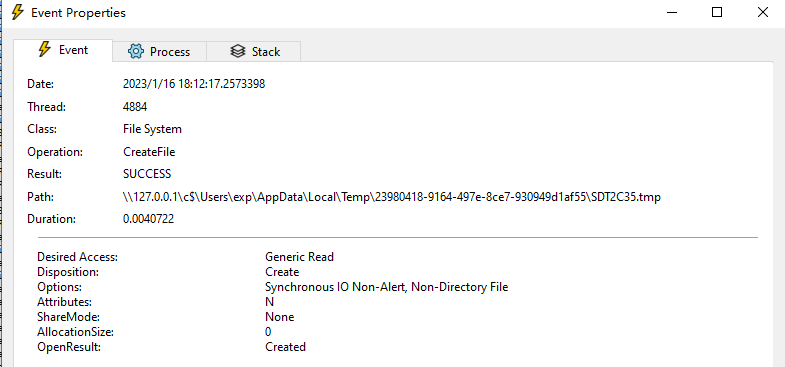
In the Stack tab, I located the function called by sdrsvc.dll, which was situated in sdengin2.dll:
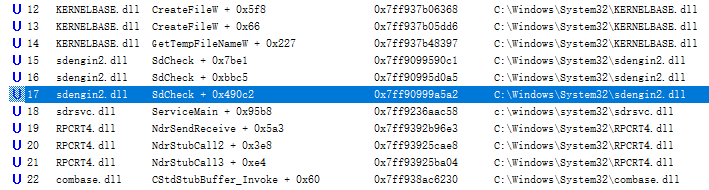
Based on SdCheck + 0x490c2, I located the function CSdCommonImpl::QueryStorageDevice in IDA. This address corresponds to the location where this function calls QueryStorageDevice.
After performing patch diffing on sdengin2.dll, I discovered the function IsWritable, which had been modified and was called by QueryStorageDevice.
2.3 Reflections
I encountered several obstacles during this vulnerability analysis:
- Unable to directly identify the vulnerable file from the vulnerability name, which prevented the use of standard patch diffing techniques at the beginning.
- The exploit did not run successfully initially. While this is common, the lack of a clear reason made me assume it was due to my unfamiliarity with the backup service’s functionality and the exploit code.
- Unfamiliarity with the exploit code led to:
- Spending significant time researching related materials.
- Having to distinguish helper code from the code directly executing the vulnerability.
Additionally, I had rarely analyzed vulnerabilities with pre-existing, functional exploits before. I was accustomed to starting with static analysis and supplementing it with dynamic analysis in WinDbg. Usually, when encountering a usable PoC, I would trigger the crash directly and debug it from the crash point backward using WinDbg. I had never used Procmon for dynamic monitoring, yet my previous methods had successfully analyzed vulnerabilities, which led me to underestimate the effectiveness of Procmon’s dynamic monitoring.
However, Procmon is not a silver bullet. It appears highly effective for locating vulnerability points, but if the vulnerability location has already been identified through other means, the assistance provided by Procmon is less pronounced, and the analysis can be completed via other methods.
3. Vulnerability Mechanism
3.1 Patch Comparison
Before Patching:
__int64 __fastcall IsWritable(unsigned __int16 *a1, int a2, int *a3)
{
  ...
  v7 = -1;
  if ( a2 == 7 )
  {
    if ( !GetTempFileNameW(a1, L"SDT", 0, TempFileName) )// If getting temp file name fails, enter if block
    {
      rtnValue = v17;
LABEL_28:
      *a3 = v6;
toend2:
      if ( v7 != -1 )
      {
        CloseHandle(v7);
        rtnValue = v17;
      }
      goto end;
    }
    rtnValue = SxDeleteFile(TempFileName);      // Delete any previously existing tmp file
    v17 = rtnValue;
    v8 = 0x148;
    if ( rtnValue >= 0 )                        // Deletion successful
    {
      v18 = 0x148;
LABEL_27:
      v6 = 1;
      goto LABEL_28;
    }
toend:
    v19 = v8;
    goto end;
  }
  ...
}
In the code above, a2 is related to the type of path passed. Since the exploit passes a UNC path, the program flow eventually reaches this block.
According to the documentation for GetTempFileNameW, when its third parameter is 0, the function attempts to generate a unique numeric filename using the system time. If the file already exists, the number increments until the filename is unique. In this scenario, the function creates an empty file with that name and releases its handle. Therefore, prior to the patch, the system checked whether the provided UNC path was writable by determining if GetTempFileNameW could successfully create a temporary file. If it was writable, the created temporary file was subsequently deleted.
After Patching:
__int64 __fastcall IsWritable(unsigned __int16 *a1, int a2, int *a3)
{
  ...
  v7 = -1;
  if ( a2 == 7 )
  {
    if ( CheckDevicePathIsWritable(a1) < 0 )
    {
LABEL_10:
      rtnValue = v16;
      *a3 = v6;
toend2:
      if ( v7 != -1 )
      {
        CloseHandle(v7);
        rtnValue = v16;
      }
      goto end;
    }
LABEL_9:
    v6 = 1;
    goto LABEL_10;
  }
After the patch, the original call to GetTempFileNameW was replaced by CheckDevicePathIsWritable. The implementation of GetTempFileNameW resides in kernelbase.dll. If you compare them closely, you will find that most of the code in these two functions is identical, with only one key difference to note when creating the temporary file:
// GetTempFileNameW
v24 = CreateFileW(lpTempFileName, GENERIC_READ, 0, 0i64, 1u, 0x80u, 0i64);

// CheckDevicePathIsWritable
v22 = CreateFileW(FileName, GENERIC_READ, 0, 0i64, 1u, 0x4000080u, 0i64);
As we can see, in CheckDevicePathIsWritable, the sixth parameter dwFlagsAndAttributes of CreateFileW changed from 0x80 to 0x4000080—that is, from FILE_ATTRIBUTE_NORMAL to FILE_ATTRIBUTE_NORMAL | FILE_FLAG_DELETE_ON_CLOSE.
According to the documentation, FILE_FLAG_DELETE_ON_CLOSE indicates that the file will be deleted immediately once all of its handles are closed. Furthermore, subsequent requests to open the file must specify the FILE_SHARE_DELETE sharing mode; otherwise, they will fail.
In short, the patched code integrates the creation and deletion of the temporary file into a single atomic operation.
3.2 Vulnerability Analysis
The patch comparison results confirm that this is a race condition vulnerability. Because the creation and deletion of the temporary file occur sequentially and without restrictions placed on the file between the two operations, an attacker can create another thread to acquire a handle to the temporary file after it is created but before it is deleted. By establishing an opportunistic lock (oplock) to block other threads, the attacker can delete the file and redirect the original file path to another file via symbolic links. When the oplock is released, the target file pointed to by the link will be deleted instead.
4. Exploitation
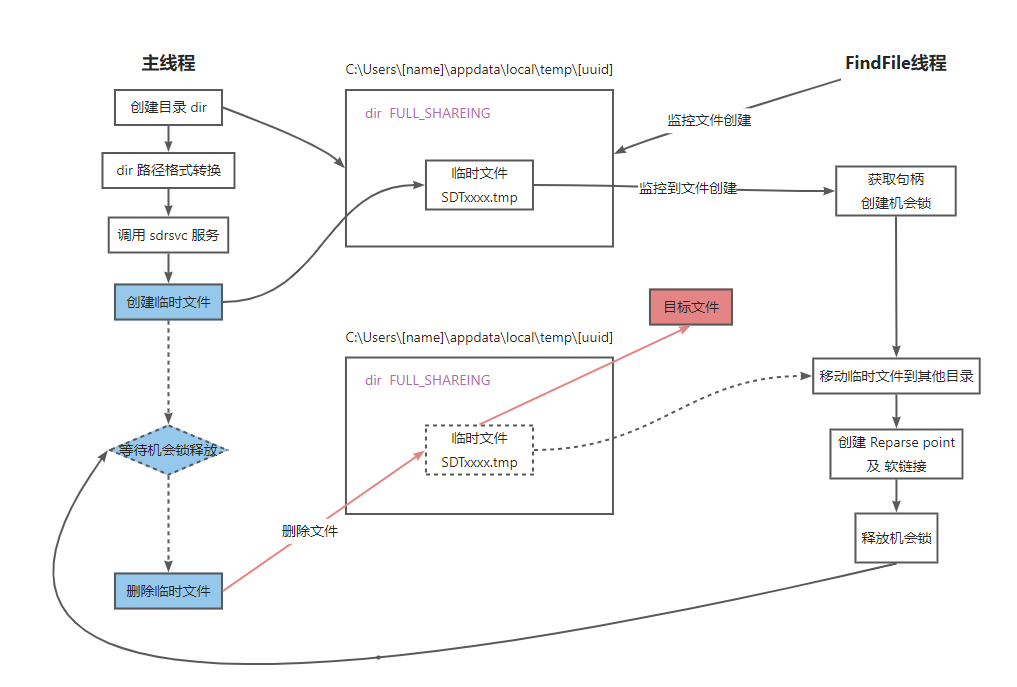
4.1 Exploitation Flow for Arbitrary File Deletion
- Under the temporary directory, create a directory
dirwithFULL_SHARINGpermissions to store the temporary file. - Create a thread
FindFileto monitor file creation events within thedirdirectory:- Acquire a handle to the newly created file and establish an oplock.
- Move the created file to another directory.
- Create a symbolic link pointing the original file path to the target file to be deleted.
- Release the oplock.
- The main thread converts the path of directory
dirinto UNC format and calls theCSdCommonImpl::QueryStorageDeviceinterface of thesdrsvcservice viaCoCreateInstance. - The
sdrsvcservice creates a temporary file in the UNC directory and subsequently attempts to delete it.
As shown in the diagram below:
4.2 Privilege Escalation Exploitation
4.2.1 Analysis of the LPE Mechanism
This section generally aligns with ZDI’s blog post, which is summarized here.
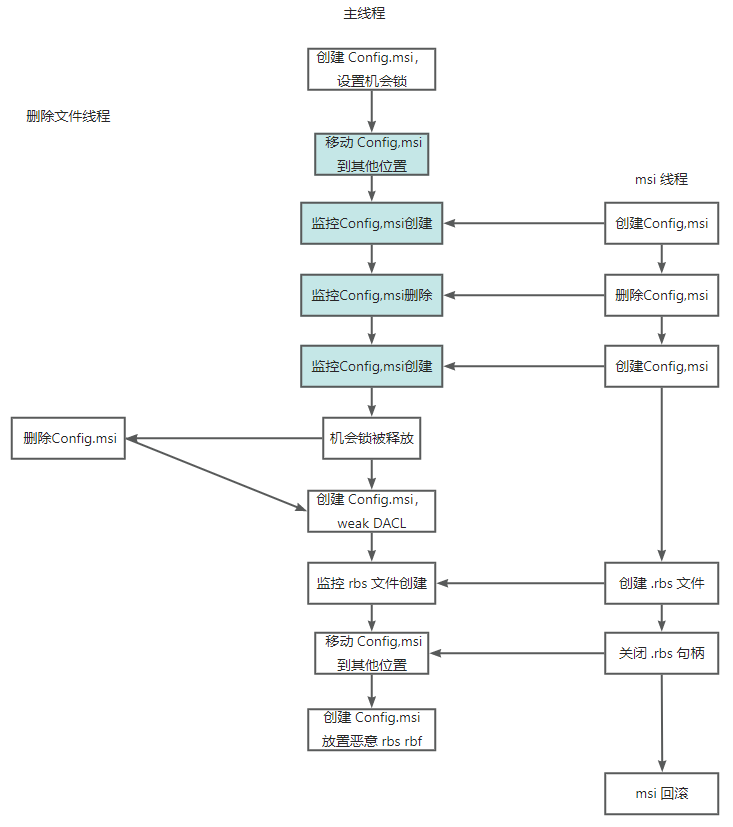
In short, migrating from arbitrary file deletion to local privilege escalation requires winning a race condition against the execution of the MSI installer.
The Windows Installer service handles application installation, while .msi files define the changes made during installation (e.g., creating folders, copying files, modifying registry keys). Because system modifications occur during installation, the MSI service creates a folder named C:\Config.msi to record all changes in .rbs files and stores backups of replaced system files as .rbf files within it. This allows the system to rollback in case of an installation error. If an attacker can replace these .rbf files, they can overwrite system files with arbitrary malicious files. Because of this file replacement risk, C:\Config.msi and its contents default to strong DACLs.
However, if an attacker has an arbitrary directory deletion primitive, they can delete C:\Config.msi, recreate a weak-DACL C:\Config.msi directory, and replace the .rbf files after the MSI installer creates them, achieving privilege escalation via malicious .rbf files.
Specifically, during execution, the MSI service performs a Create -> Delete -> Recreate sequence on the C:\Config.msi directory before beginning to write .rbs files. Therefore, the arbitrary directory deletion must delete the C:\Config.msi directory after it is recreated but before the .rbs file is created. The attacker must then monitor for the creation of the .rbs file and swap the files. The race condition occurs during this window.
The vulnerability discussed is an arbitrary file deletion. If we only have an arbitrary file deletion primitive, we can delete the C:\Config.msi::$INDEX_ALLOCATION alternate data stream, which achieves directory deletion in the same manner.
The workflow for privilege escalation via arbitrary file deletion is illustrated below:
4.2.2 Failure Analysis
The workflow described above treats the deletion of Config.msi as an atomic action. However, in CVE-2023-21752, file deletion itself requires winning a race condition and involves relatively complex steps. This means that to achieve local privilege escalation using this vulnerability, the attacker must win two separate race conditions simultaneously. This explains why my initial attempts at reproduction always failed.
To better understand the execution flow of the exploit code, I added and modified comments in the source code, producing the following execution log:
PS C:\Users\exp\Desktop> C:\Users\exp\Desktop\SDRsvcEop.exe
[wmain] Config.msi directory created!
[wmain] Directory: C:\users\exp\appdata\local\temp\3bbbd2cf-7baf-42b7-98ea-242f703b08f8
[wmain] Got handle of uuid directory
[wmain] Finish create oplock for config.msi

[Trigger] Path: \\127.0.0.1\c$\Users\exp\AppData\Local\Temp\3bbbd2cf-7baf-42b7-98ea-242f703b08f8
[FindFile] Found added file C:\users\exp\appdata\local\temp\3bbbd2cf-7baf-42b7-98ea-242f703b08f8\SDT73B.tmp
[FindFile] Got handle of C:\users\exp\appdata\local\temp\3bbbd2cf-7baf-42b7-98ea-242f703b08f8\SDT73B.tmp
[cb] Oplock!
[Move] Finish moving to \??\C:\windows\temp\c5b82788-8133-4971-b351-38f58233ced1
[CreateJunction] Junction \\?\C:\Users\exp\AppData\Local\Temp\3bbbd2cf-7baf-42b7-98ea-242f703b08f8 -> \RPC Control created!
[DosDeviceSymLink] Symlink Global\GLOBALROOT\RPC Control\SDT73B.tmp -> \??\C:\Config.msi::$INDEX_ALLOCATION created!
[FindFile] End

[Move] Finish moving to \??\C:\windows\temp\0f1161f2-a8c5-4798-a71d-f32ebba87125
[install] MSI file: C:\windows\temp\MSI72F.tmp
[install] Start ACTION=INSTALL
[cb1] Detect first create
[cb1] Detect first delete
[install] Start REMOVE=ALL
[install] Start delete msi file

[Fail] Race condtion failed!
[DeleteJunction] Junction \\?\C:\Users\exp\AppData\Local\Temp\3bbbd2cf-7baf-42b7-98ea-242f703b08f8 deleted!
[DelDosDeviceSymLink] Symlink Global\GLOBALROOT\RPC Control\SDT73B.tmp -> \??\C:\Config.msi::$INDEX_ALLOCATION deleted!
I added line breaks between the output logs for clarity. During the file deletion phase, the program detected the generation of the temporary file and successfully created the symbolic link. However, because the symbolic link directed the temporary file to C:\Config.msi::$INDEX_ALLOCATION, and the oplock on C:\Config.msi was held by the MSI thread, the deletion operation stalled.
Meanwhile, the MSI thread only detected the first creation and deletion of C:\Config.msi but failed to detect the second creation. Since a loop was used to detect creation behavior, this thread fell into an infinite loop.
The failure to win the race condition against the MSI thread resulted in a deadlock between the two threads, causing the exploit to fail.
4.2.3 Troubleshooting and Resolution
First, I mapped the entire execution flow of the exploit code into the following diagram:
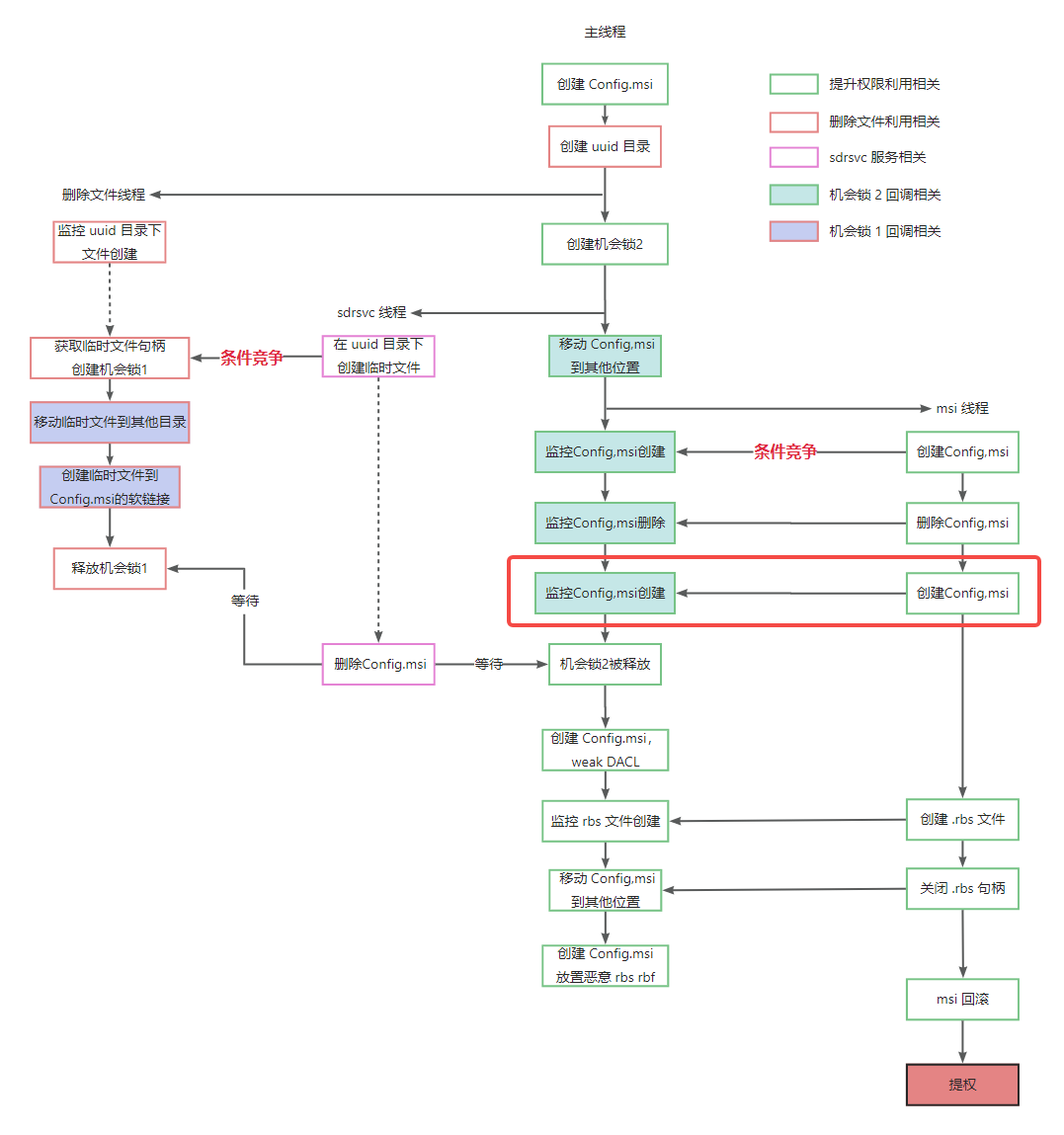
The red box highlights where the race condition failed.
I tried increasing the number of CPUs on the virtual machine and optimizing the code monitoring the creation of Config.msi, but neither approach succeeded. I also monitored the MSI file execution separately using Procmon and confirmed that the Config.msi directory was indeed recreated a second time.
Thus, the only logical conclusion was that the second creation of the Config.msi directory occurred too quickly. However, since the recreation of the Config.msi directory definitely takes place, and the exploit has already detected the first deletion, what would happen if we released oplock 2 at that exact moment?
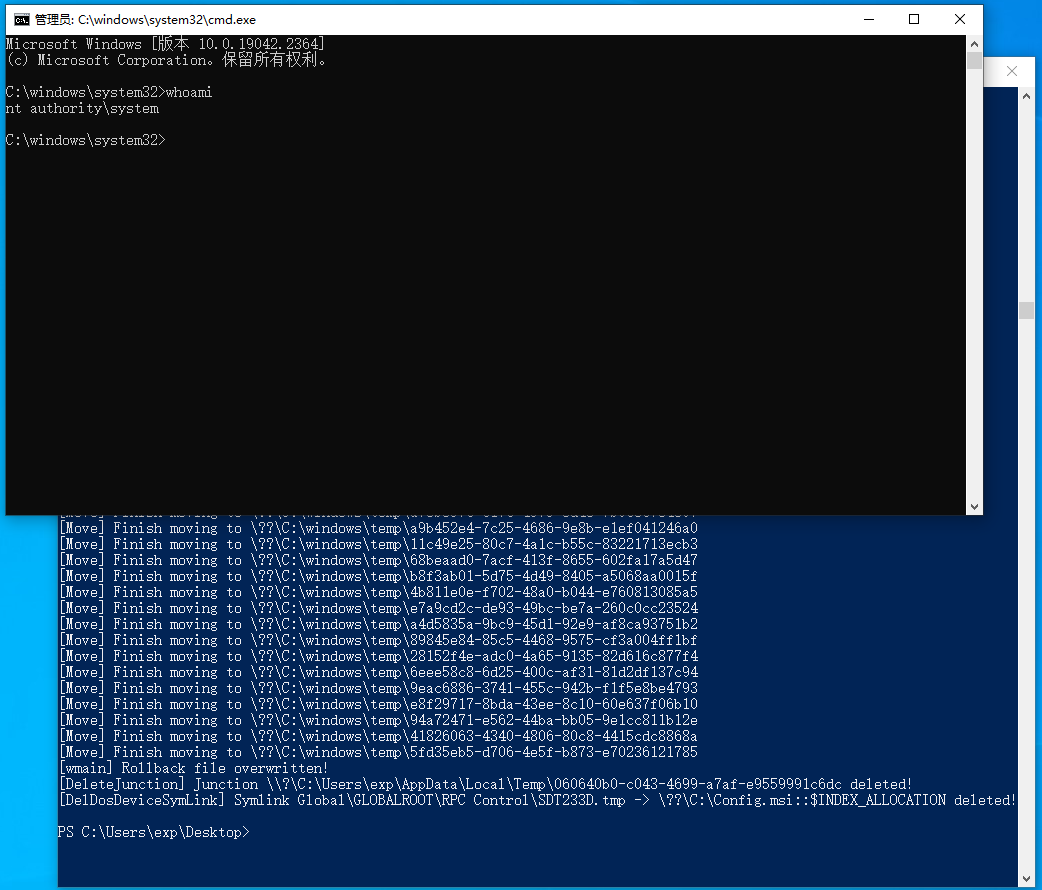
If we skip monitoring the second creation of the Config.msi directory and directly release oplock 2, the extremely short time interval of the recreation allows the waiting sdrsvc to successfully delete Config.msi. Under these conditions, the exploit execution flow can proceed and successfully elevate privileges!
4.3 The Symbolic Link Issue
Previously, I had questions regarding how the exploit code linked to the target file to be deleted. In fact, this exploitation technique originated from James Forshaw, and references 5 and 6 describe it in detail.
A reparse point/junction is a folder attribute in the NTFS file system that the NTFS driver reads when opening a folder. It can be used to link directories together. Suppose we want to establish a junction pointing directory A to directory B: as long as a normal user has write permission to directory A, they can perform this operation, regardless of their permissions on directory B.
In Windows, the C: drive directory we often refer to is not an actual folder; it is a symbolic link object pointing to the device’s physical address. You can use WinObj to view the \GLOBAL?? directory and see that C: is a SymbolicLink object. When we access a file on the C drive, the system translates the access path to the real physical device address. Normal users can also create or delete symbolic links in the Object Manager, but this action is restricted to specific directories, such as \RPC Control.
In the execution logs of the exploit code shown above, there are two lines of output:
[CreateJunction] Junction \\?\C:\Users\exp\AppData\Local\Temp\3bbbd2cf-7baf-42b7-98ea-242f703b08f8 -> \RPC Control created!
[DosDeviceSymLink] Symlink Global\GLOBALROOT\RPC Control\SDT73B.tmp -> \??\C:\Config.msi::$INDEX_ALLOCATION created!
First, a junction is created from the attacker-controlled directory 3bbbd2cf-7baf-42b7-98ea-242f703b08f8 pointing to \RPC Control. Thus, accessing this controlled directory is equivalent to accessing \RPC Control. Next, a symbolic link SDT73B.tmp is created under \RPC Control pointing to the target file to be deleted. This effectively links SDT73B.tmp within the controlled directory to the target file. Deleting SDT73B.tmp therefore deletes the target file.
6. References
- https://mp.weixin.qq.com/s/dhKtb8EeBwJnBEjepHXPpg
- Windows Exploitation Tricks: Exploiting Arbitrary Object Directory Creation for Local Elevation of Privilege
- CVE-2023-21752 exp
- ABUSING ARBITRARY FILE DELETES TO ESCALATE PRIVILEGE AND OTHER GREAT TRICKS
- Follow the Link: Exploiting Symbolic Links with Ease
- Understanding and Exploiting Symbolic links in Windows - Symlink Attack EOP